PyBreeze
PyBreeze:自动化优先的 IDE



| English | 繁體中文 |
PyBreeze 是一款专为自动化工程师打造的 Python IDE。Web、API、GUI 和负载测试都在同一个窗口里,旁边还有自动化工作真正需要的日常 HTTP 工具——不用到处找插件,也不用费力考究环境。
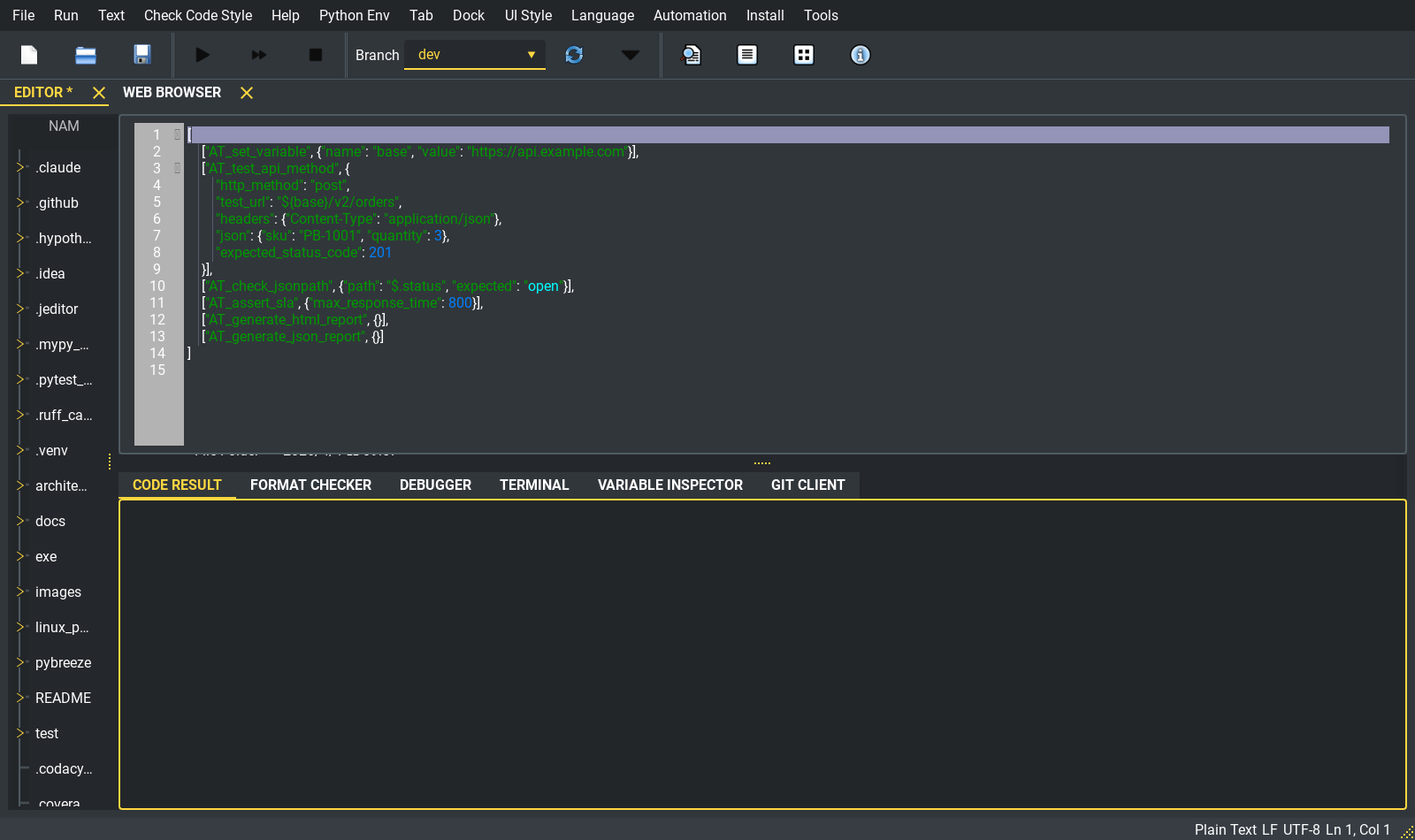
主窗口:编辑器打开着一个 APITestka 动作文件,左侧是项目树,下方是运行/格式检查/调试/终端面板。
目录
截图导览
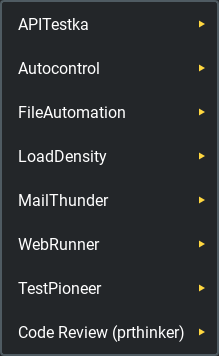
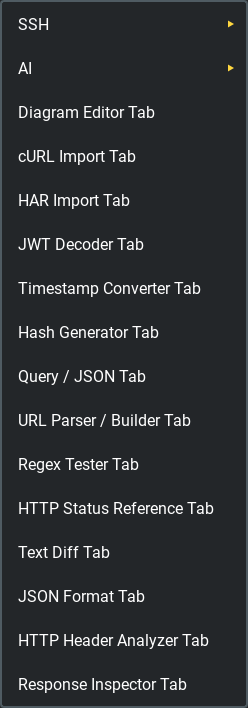
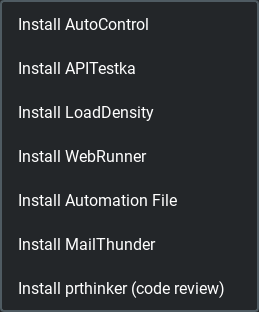
IDE 的大部分功能都在三个菜单里。Automation 运行你的脚本,Tools 打开各种工具标签页,Install 安装各个模块。
| Automation | Tools | Install |
|---|---|---|
 |
 |
 |
每次自动化运行都在独立的子进程中进行。输出会流回运行窗口,编辑器始终保持响应——stdout 以普通颜色显示,stderr 以红色显示,最后是进程的退出码:
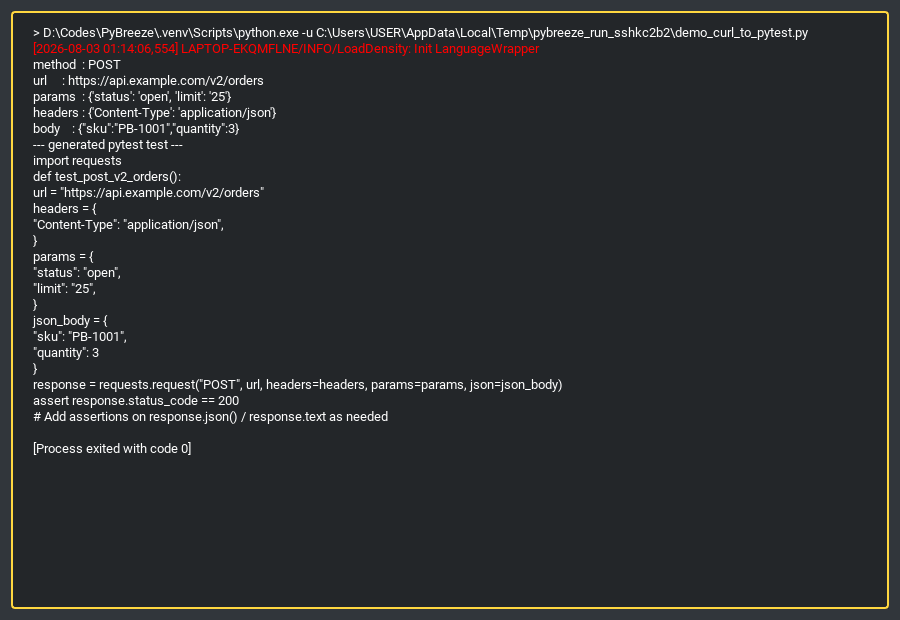
一次真实的运行:通过 IDE 的文件运行器调用 PyBreeze 自带的 curl 解析器,生成一个 pytest 测试。
四维自动化
PyBreeze 开箱即用,涵盖自动化测试的完整范围:
| 维度 | 模块 | 功能 |
|---|---|---|
| API | APITestka | RESTful 测试,包含请求构建器、响应分析器、Mock 服务器与断言 |
| Web | WebRunner | 由浏览器驱动的交互与测试,集成驱动程序与元素定位器 |
| GUI | AutoControl | 桌面自动化:图像识别、坐标、键盘/鼠标控制与录制 |
| Load | LoadDensity | 高并发性能测试,检验系统在压力下的稳定性 |
此外还有:
- 文件自动化 — 通过 automation-file 进行文件与目录操作
- 邮件自动化 — 通过 MailThunder 投递报告
- 测试框架 — 通过 TestPioneer 进行 YAML 驱动的执行
每个模块的菜单结构都相同:Run(单个脚本、整个目录批量运行,可选择是否以邮件发送报告)、Help(文档与 GitHub 以 IDE 内的浏览器标签页打开)、Project(生成模板目录),有原生 GUI 的模块还会提供一个 GUI 标签页。
IDE 核心
- 自动化关键字集 — 在 JEditor 的语言支持之上,为
.json注册了AT_*/ GUI / Web / Load 关键字集,为.yml和.yaml注册了 TestPioneer 的结构定义。JEditor 目前还不会为它们着色:它用自己针对这些扩展名的规则高亮,不会用到注册的关键字 - 代码编辑器 — 基于 JEditor 构建:标签页、项目树、格式检查、调试器、终端以及 git 客户端面板
- 脚本执行 — 单个或批量运行,每次运行都有自己的窗口和 Stop 按钮(Run ▸ Stop All Program 会全部停止);动作文件以路径传入,而前台标签页中的脚本若超出 Windows 命令行的长度上限(约 32 KB),会改经临时文件传递
- 报告生成 — 运行后生成 HTML / JSON / XML 报告,可选以邮件发送
- 集成 JupyterLab — 以标签页方式启动,使用与运行脚本相同的解释器;那里没有 JupyterLab 时会自动安装
- 虚拟环境感知 — 运行时使用在 Python Env 中选择的解释器;没有选择时,自动检测并使用工作文件夹中的
venv/或.venv/,都没有时则以 IDE 本身所用的解释器运行
内置工具
只有一个主要按钮的工具,在工具里任何地方按 Ctrl+Enter 就等于按下那个按钮:文本框里的 Enter 是换行。Query ↔ JSON 与 URL 解析/构建器可以双向转换,Ctrl+Enter 会根据输入决定方向:输入是 JSON 对象时从 JSON 转出。
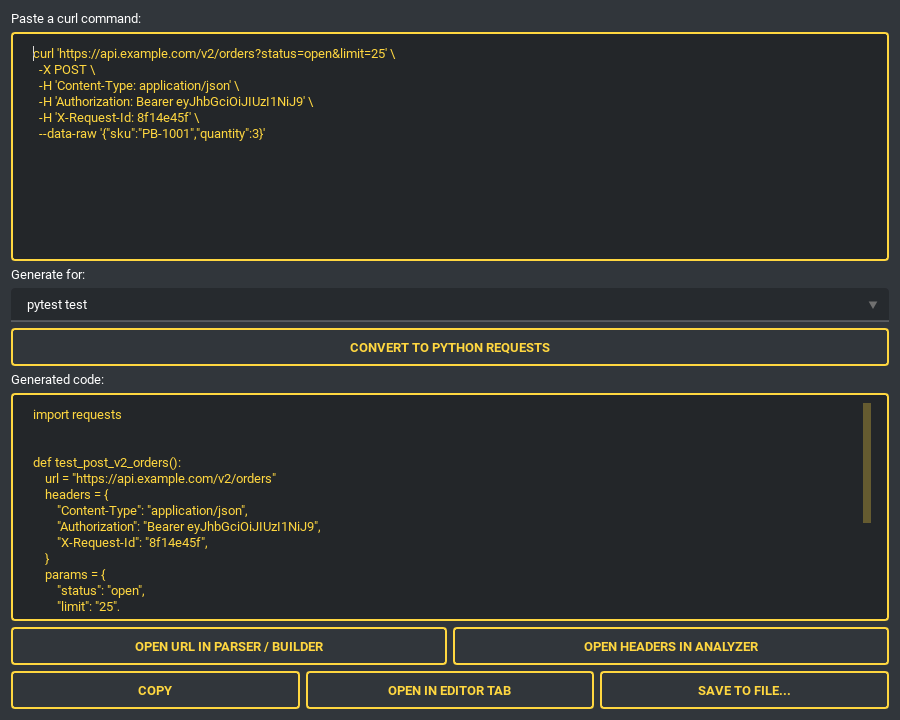
cURL 导入——复制的请求变成可运行的脚本
从浏览器开发者工具粘贴一条 curl 命令,选择目标格式。解析器能处理方法、URL、请求头、请求体、basic auth、-G 查询参数、-F multipart 字段(上传会变成 files=open(...))、--json 简写、-d @file 请求体以及多行续行。重复的 -H 值会按照 HTTP 的方式合并(cookie 用 ; ,其他用 , ),而不是悄悄只保留最后一个。它从不执行任何东西——纯粹只做解析。
| 目标:pytest | 目标:APITestka JSON 动作 |
|---|---|
 |
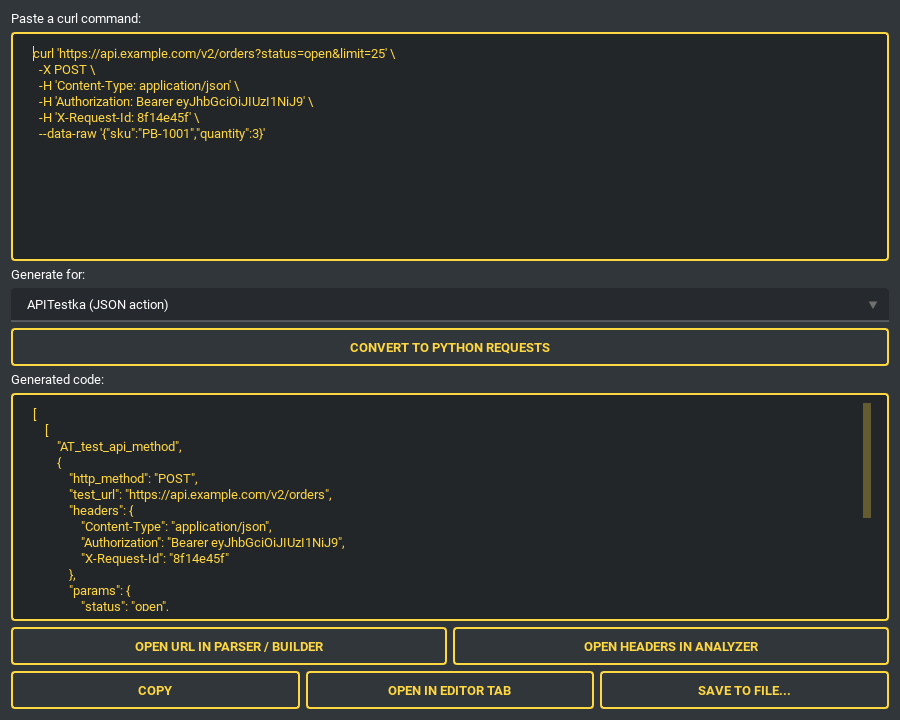 |
目标格式:Python requests、可直接运行的 pytest 测试、APITestka(Python,或可由 execute_files 直接运行的 [["AT_test_api_method", {...}]] 动作列表),以及 LoadDensity 的 Locust 负载测试。可以复制输出、直接在编辑器标签页中打开,或以正确的扩展名保存。只需一次点击,还能把解析出的 URL 交给 URL 解析器/构建器,或把请求头交给请求头分析器。
HAR 导入——整个会话变成测试套件
“Copy as cURL” 只能抓一个请求;Save all as HAR 能抓下整个会话。打开导出的文件,每个记录下来的调用都会列出方法、路径、状态码与媒体类型,页面装饰资源(CSS、图片、字体)默认会被过滤掉。
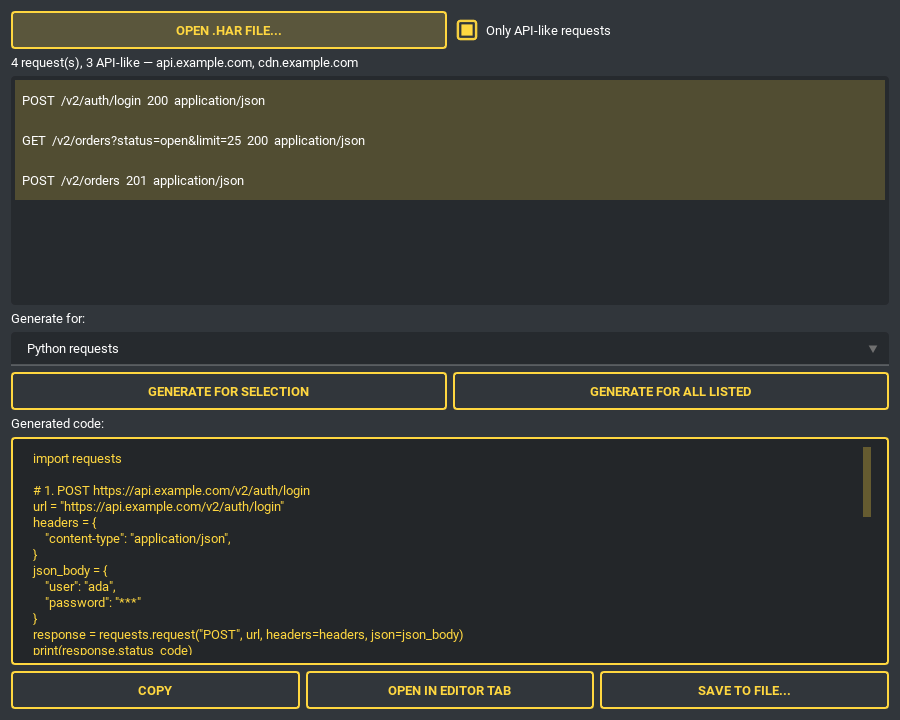
选择想要的请求——或者直接全选列出的项目——用与 cURL 导入器相同的目标格式生成一个脚本。重复的端点会得到编号的测试名称,不会有测试悄悄覆盖另一个;HTTP/2 伪请求头会被去掉,与记录的 cookie 列表重复的 Cookie 请求头也会被移除,让每个值只发送一次(同名的 cookie 无法放进字典,则改以请求头发送)。无法变成请求的条目(例如 URL 或方法格式错误)会被跳过,其余照常加载。只选一个请求时,生成的结果与 cURL 导入器完全相同。HAR 就是 JSON,因此只需要标准库,而且从不会替你重放任何请求。
响应检查器——粘贴一个响应,读懂其中的一切
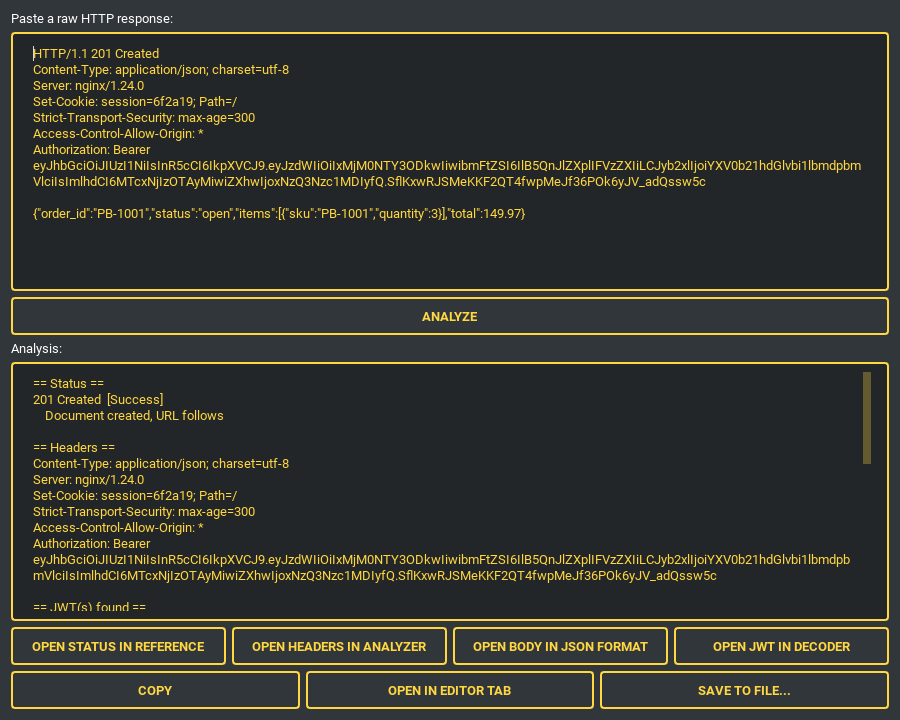
状态码会在 HTTP 参考表中查找,请求头会被解析,JSON 响应体会被格式化,文本中任何位置的 JWT(例如 Authorization: Bearer 请求头)都会被解码,其中的时间戳声明以 UTC 显示。每项发现都能在对应的工具标签页中打开,并已预先填好。
HTTP 请求头分析器——一组请求头实际上在说什么
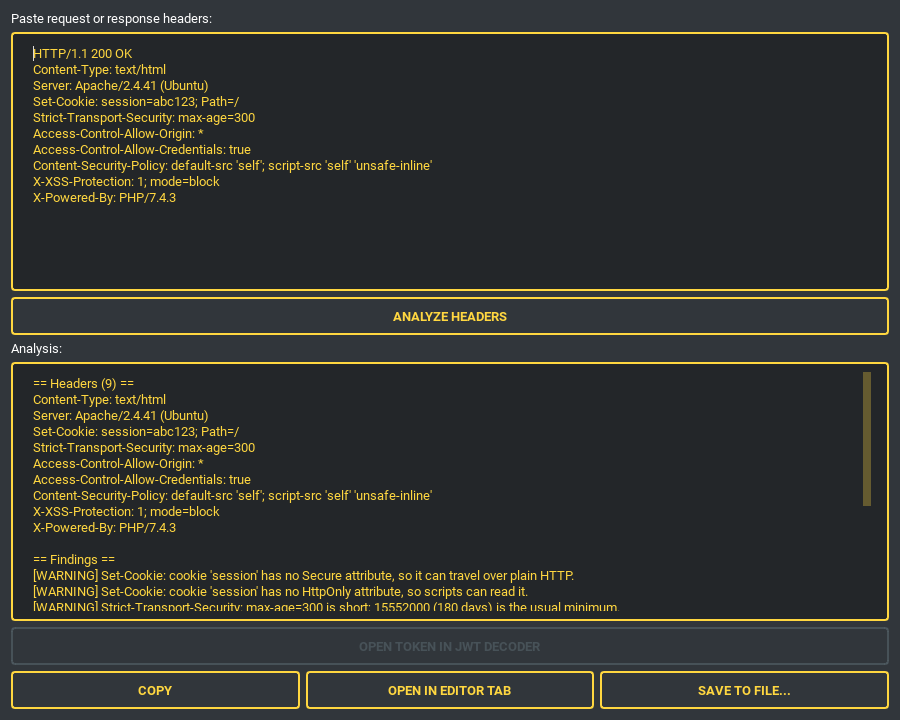
会报告:重复发送的名称、缺少 Secure / HttpOnly / SameSite 的 Set-Cookie、通配符 CORS(以及浏览器会直接拒绝的”通配符加凭据”组合)、短到撑不过一次重启的 HSTS max-age、CSP 的 unsafe-inline / unsafe-eval、产品标识、已弃用的请求头,以及——针对响应——缺少的安全请求头。携带凭据的请求头只报告名称;它们的值绝不会进入报告。
文本比较
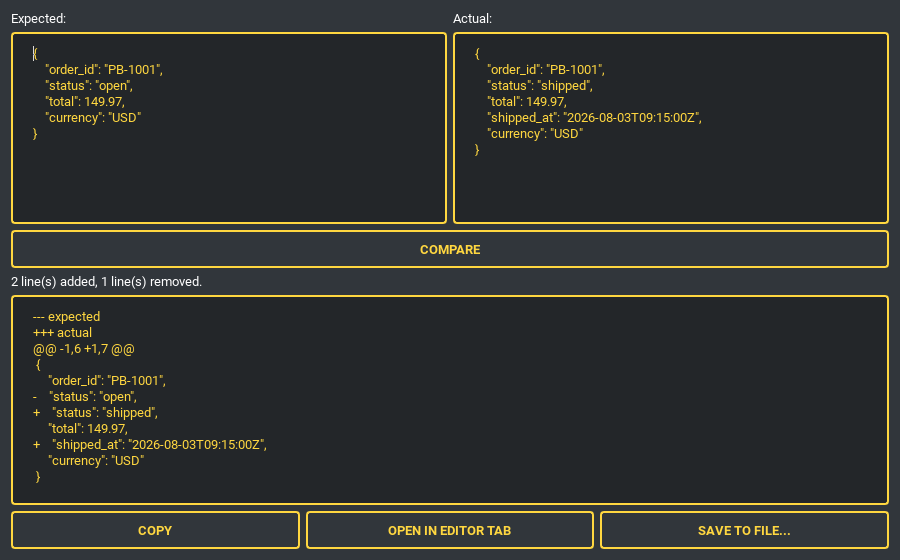
比较两份数据——例如预期与实际的 API 响应——得到 unified diff(新增与删除的行以主题的颜色标示),以及一行新增/删除的摘要。
日常小工具
每个都是一个标签页或停靠面板,底部都有相同的一排按钮:复制/在编辑器中打开/保存到文件。
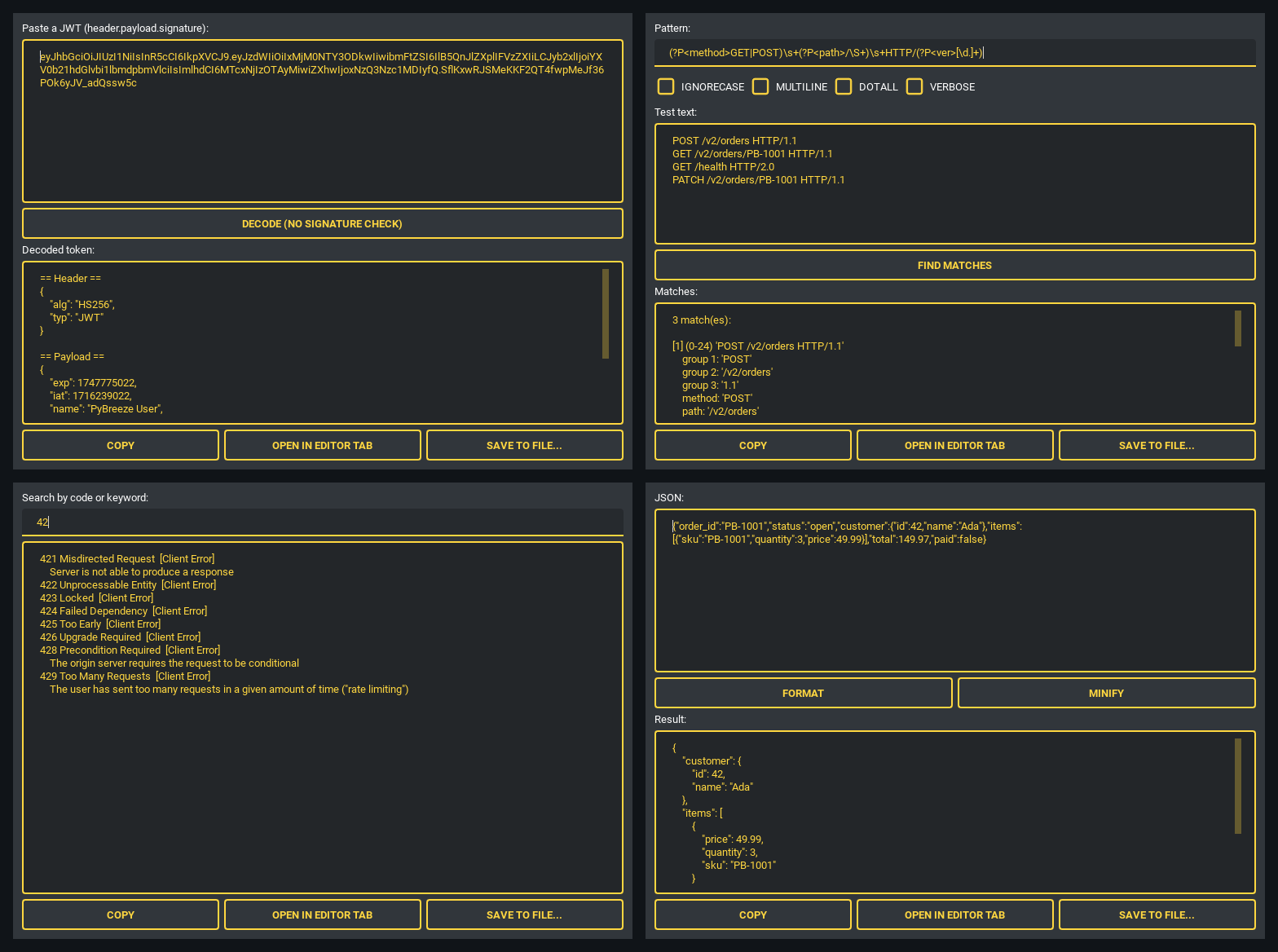
- JWT 解码器 — header 与 payload 以格式化的 JSON 显示,
exp/iat/nbf/auth_time以易读的 UTC 显示。只做查看:从不验证签名,也从不信任令牌。 - 正则表达式测试器 — 支持
IGNORECASE/MULTILINE/DOTALL/VERBOSE,列出每个匹配及其偏移量、编号分组与命名分组。在模式框中按 Enter 即可运行。无效的模式会显示友好的错误信息,而不会崩溃。 - HTTP 状态码参考 — 按状态码前缀或关键字搜索完整的状态码表(来自标准库,因此始终保持最新)。
- JSON 格式化 — 格式化或压缩,输入不是 JSON 时给出清楚的验证错误。
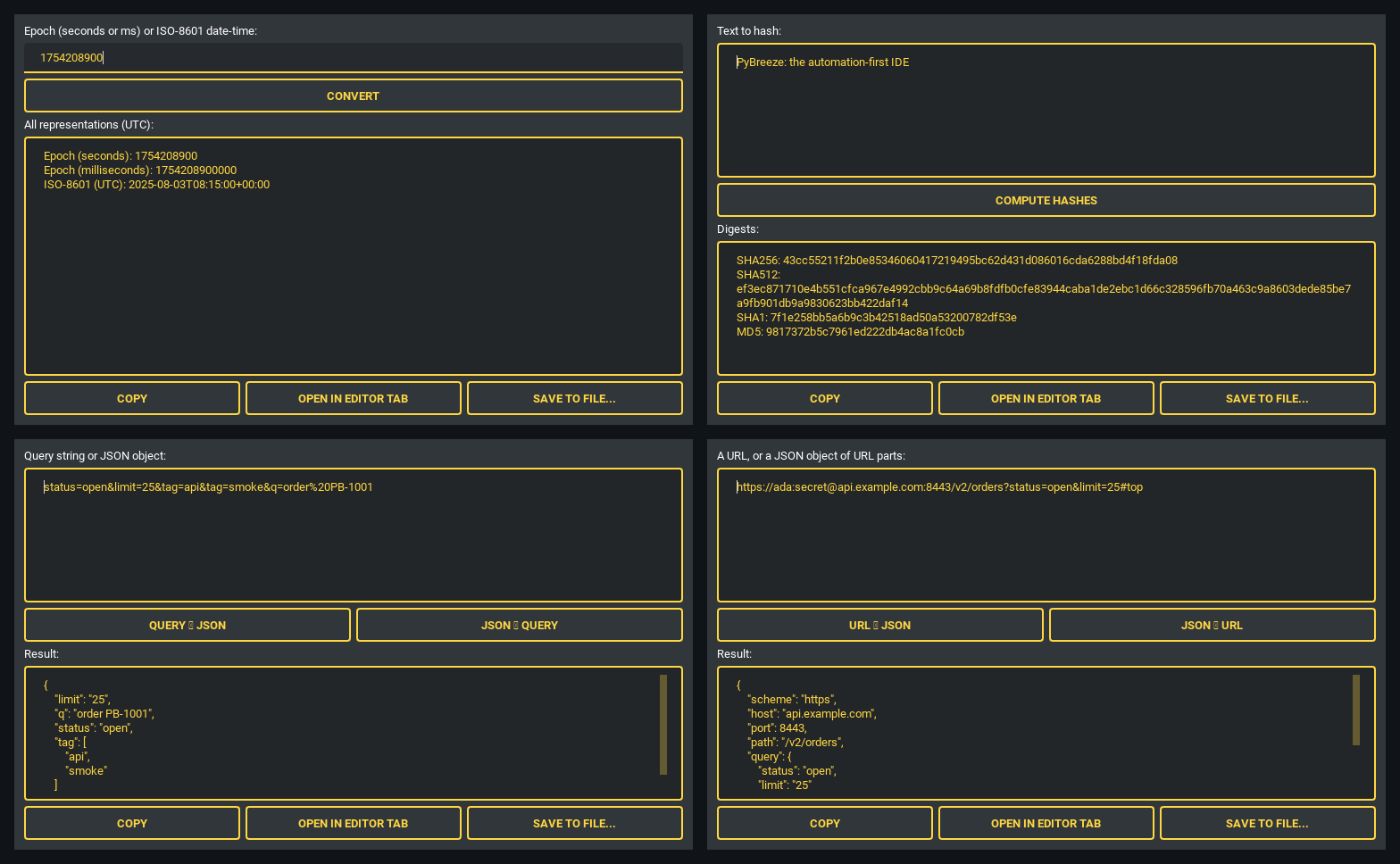
- 时间戳转换器 — 输入 Unix 时间戳(秒、毫秒、微秒或纳秒,自动识别)或 ISO-8601 日期时间(支持
Z、+08、+0800或+08:00,任意位数的小数,基本或扩展格式),输出所有 UTC 表示形式。结果确定,与本地时区无关。 - 哈希生成器 — 一次算出 SHA-256、SHA-512、SHA-1 与 MD5(MD5/SHA-1 以
usedforsecurity=False提供,只为了互操作,绝不用于安全判断)。 - Query ⇄ JSON —
application/x-www-form-urlencoded转为格式化的 JSON,也能转回去;重复的键会变成数组,反之亦然。 - URL 解析器/构建器 — 把 scheme、host、port、path、query、fragment 与凭据拆成可编辑的 JSON 对象,也能再组回 URL。会自动为 IPv6 字面量加上方括号,并重新编码查询参数。
图表编辑器——不离开 IDE 就能画架构图
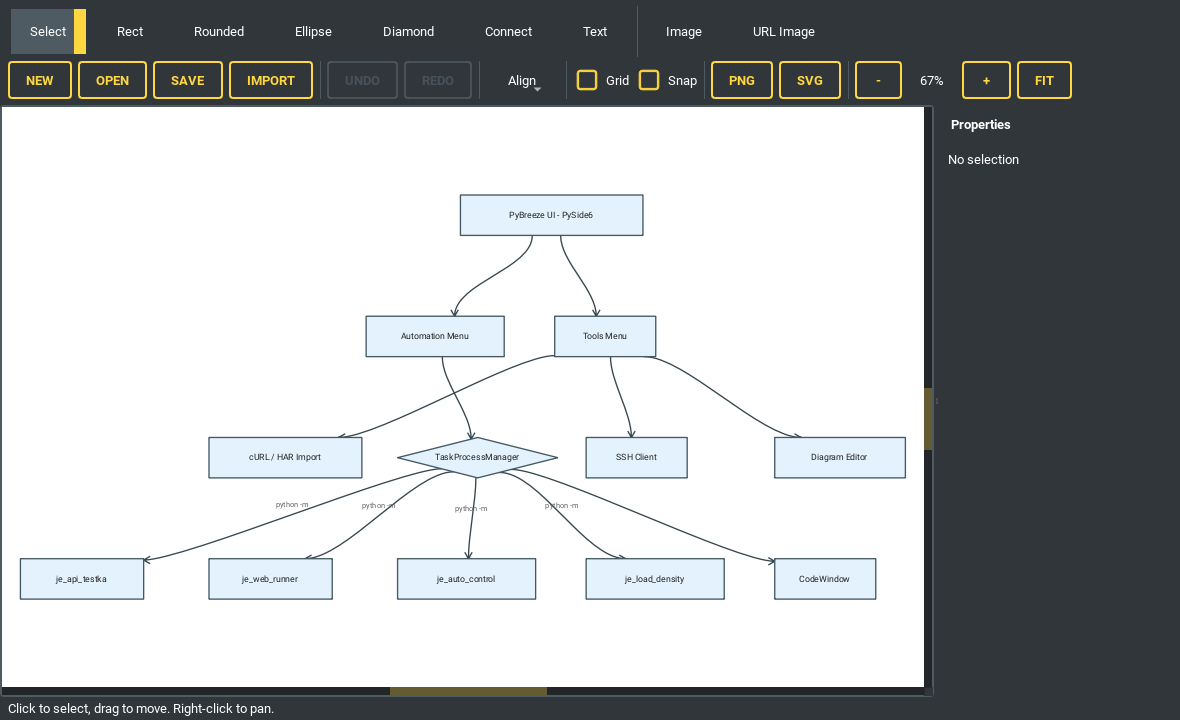
把一段 Mermaid flowchart 粘贴到导入器中,自动完成布局。
一个基于 QGraphicsScene 的所见即所得编辑器:矩形、圆角矩形、椭圆与菱形节点,带边标签的贝塞尔连线,自由文本与图片。Mermaid flowchart / graph 导入采用 Sugiyama 式布局(分层、减少交叉、跨轴对齐)。可保存和打开 .diagram.json,导出为 PNG 或 SVG,支持撤销/重做、对齐、分布、网格、吸附与缩放。从 URL 获取的图片会经过 SSRF 验证并有大小上限。
SSH 客户端——终端与远程文件树并排
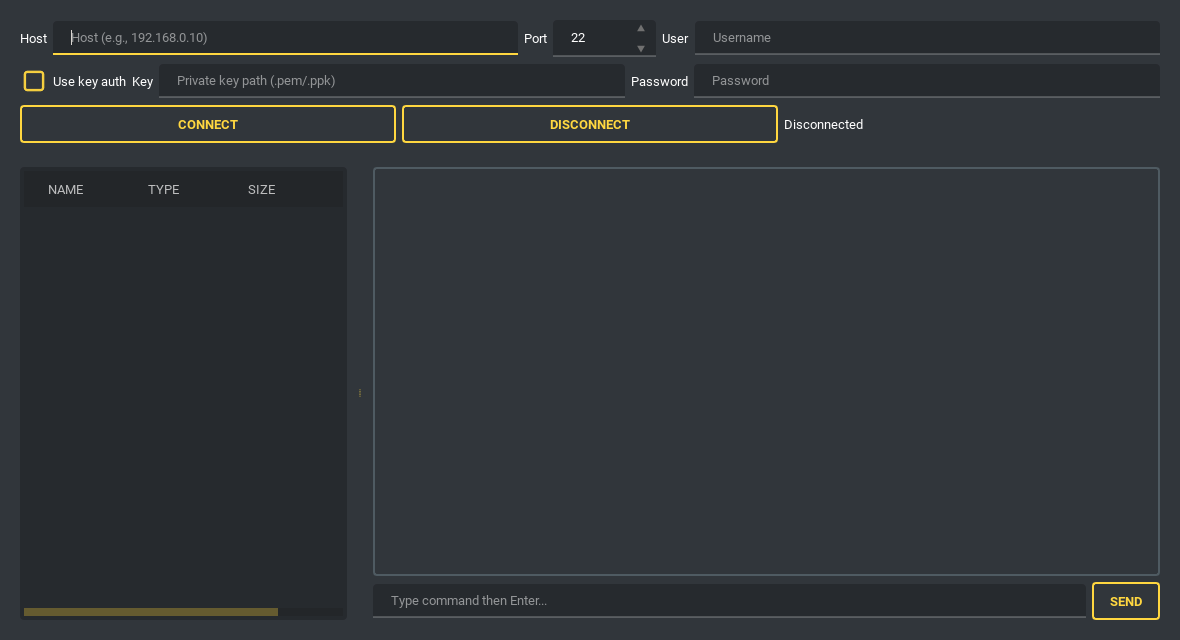
支持密码或私钥认证(用 Browse 选择密钥文件,从 ~/.ssh 开始:OpenSSH 或 PEM 格式的 RSA、Ed25519、ECDSA 密钥,PKCS#8 也可以;PuTTY 的 .ppk 密钥需先在 PuTTYgen 导出为 OpenSSH 密钥,错误信息会说明如何操作;勾选密钥认证时,密码栏会改为“密语”,填入私钥的密语),带 keepalive、会显示 ANSI 颜色的交互式 shell,以等宽字体显示,窗口大小改变时会把新的宽度和高度告诉 shell(上下方向键调出之前发送的命令,空行按 Enter 也会发送到 shell,clear 与 reset 会清空画面,Interrupt 按钮、或在未选中文字的命令行中按 Ctrl+C,可停止 shell 中正在运行的程序;界面逐行显示输出,所以 vim、htop 这类移动光标绘制整个屏幕的程序会显示错乱),以及按需加载的 SFTP 文件树,支持创建文件夹/重命名/删除/上传/下载(和项目文件树一样,F2 重命名、Delete 删除当前项目)。每个 SFTP 请求都在后台运行,因此连接卡住时也不会冻结 IDE。上传前若会覆盖服务器上的文件会先询问,传输也可以从文件树的菜单中取消。两个方向都先写入临时文件,因此连接中断时,旧的副本仍完整保留。未知的主机密钥不会被自动接受:首次连接时会显示 SHA256 指纹请你确认(首次使用即信任),并保存到 ~/.pybreeze/ssh_known_hosts。
其他
- 文件树右键菜单 — 右键即可创建、重命名、删除、复制绝对或相对路径,或在系统的文件管理器中显示该项目(在 Explorer 与 Finder 中会选中该文件)。焦点在文件树时,F2 重命名、Delete 删除当前项目。删除前会先询问,默认是“否”,删除的项目会移到回收站(Windows 的回收站);没有回收站的地方(例如某些网络驱动器),会再询问一次才永久删除。重命名或删除一个已在编辑器标签页中打开的文件时,标签页会保持同步。
- 包管理器 — 从菜单安装自动化模块与构建工具,输出显示在运行窗口中。
- 集成文档 — 每个模块的文档与 GitHub 页面都以 IDE 内的浏览器标签页打开(TestPioneer 的文档就是它 GitHub 上的 README)。
AI 辅助开发
和工具一样,在 AI 代码审查、CoT 代码审查或 Skill Send 中按 Ctrl+Enter,就等于按下发送按钮。
AI 代码审查
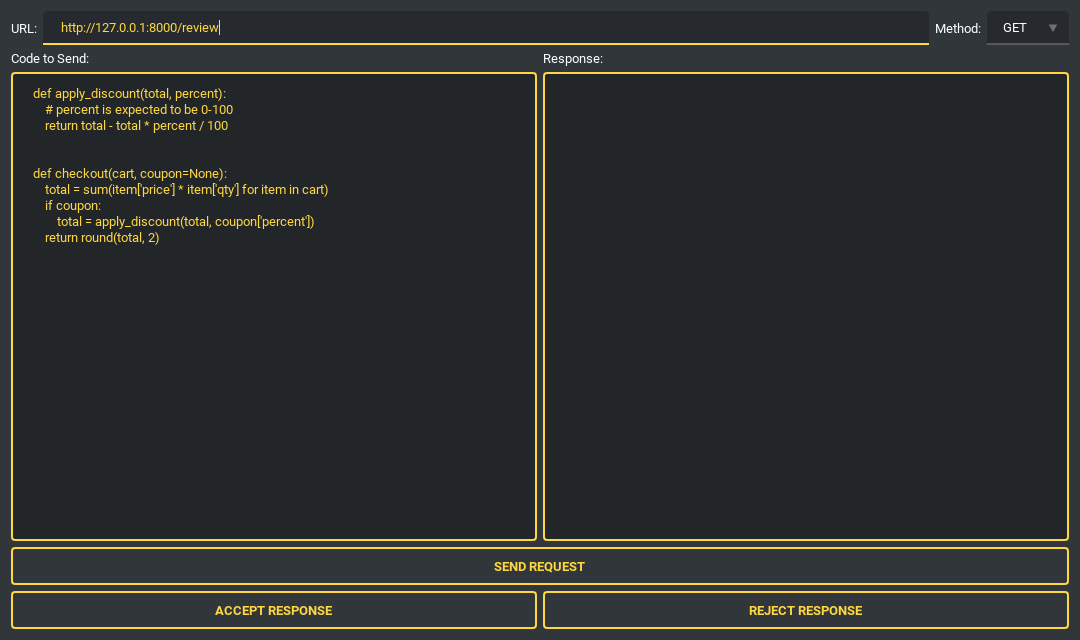
图中为发送前的状态。 把选中的代码发送到 LLM 端点(以 POST(默认)或 PUT 发送,代码放在请求体的表单字段 code 中;GET 与 DELETE 只发送 URL),然后接受或拒绝建议——统计记录保存在 ~/.pybreeze/response_stats.txt。URL 会经过 SSRF 验证,连接只会连到经过检查的地址,不跟随重定向,响应体在到达面板之前会被限制大小。因此本机或私有网络上的端点(例如在本机运行的模型服务器)会被拒绝;CoT Code Review 与 Skill Send 也以同样的方式检查端点 URL。
思维链代码审查(prthinker)
对正在编辑的文件或一个 Pull Request 运行 prthinker 流程,输出实时流入运行窗口。
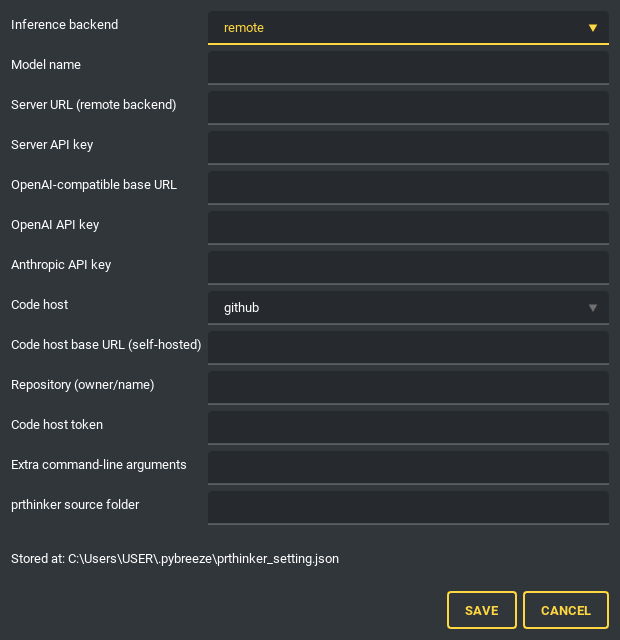
一张设置表就包含推理后端(remote、local、OpenAI 兼容、Anthropic、Gemini、Cohere、Mistral、claude-cli、codex-cli)、代码托管平台(GitHub / GitLab / Gitea)与仓库。密钥与令牌以环境变量交给审查,绝不放在命令行上——那是进程列表看得到的地方——并且在日志中会被遮蔽。模型名称会交给所选的后端。规则检索(RAG)默认为 off,除非设为 remote,此时会向 prthinker 服务器的 /rag 查询:prthinker 的本地规则索引随它的仓库提供,而不在从仓库安装的包里。审查以 Python Env 中选择的解释器运行,因此 PyBreeze 本身可以停留在比 prthinker 所需的 3.12 更旧的 Python 上。
CoT 提示词编辑器
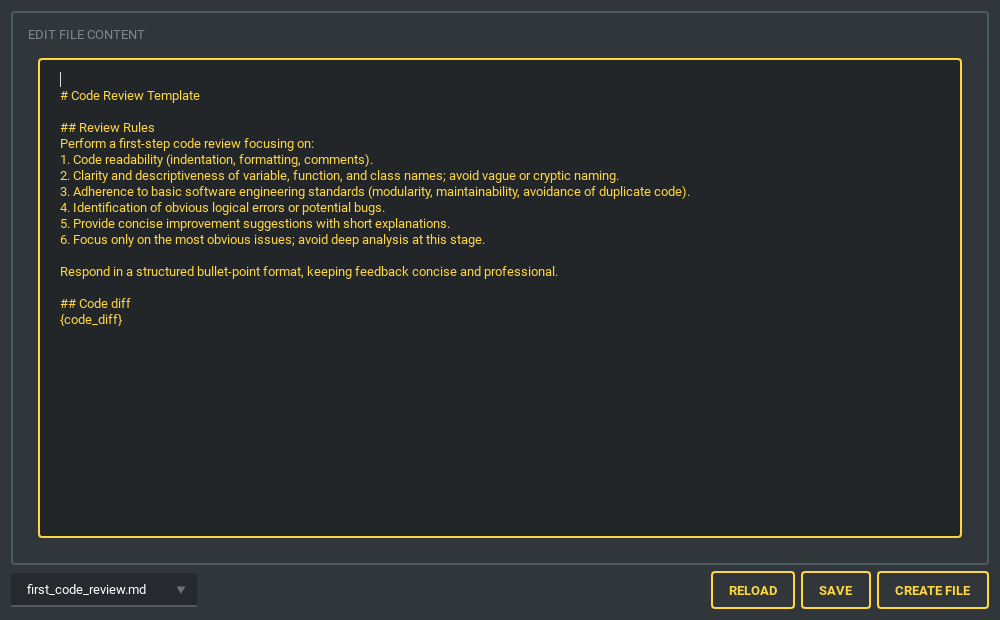
创建和管理多步骤的审查链:第一次摘要 → 第一次代码审查 → 对该审查的评判 → linter → 代码坏味道检测 → 逐步分析 → 总摘要 → 对摘要的评判。每一步都会引用它所需的前面步骤的回答。文件受到监视,因此外部的编辑会立即显示出来。
从 Tools → AI → CoT Code Review(一个标签页,或从 Dock 菜单打开停靠面板)运行这条审查链:粘贴代码,填入端点 URL,每一步的回答一到达就会出现在选择器中。每一步都以 POST 发送 JSON {"prompt": "..."},响应体(按文本读取)就是这一步的回答。
Skill 提示词编辑器与 Skill Send
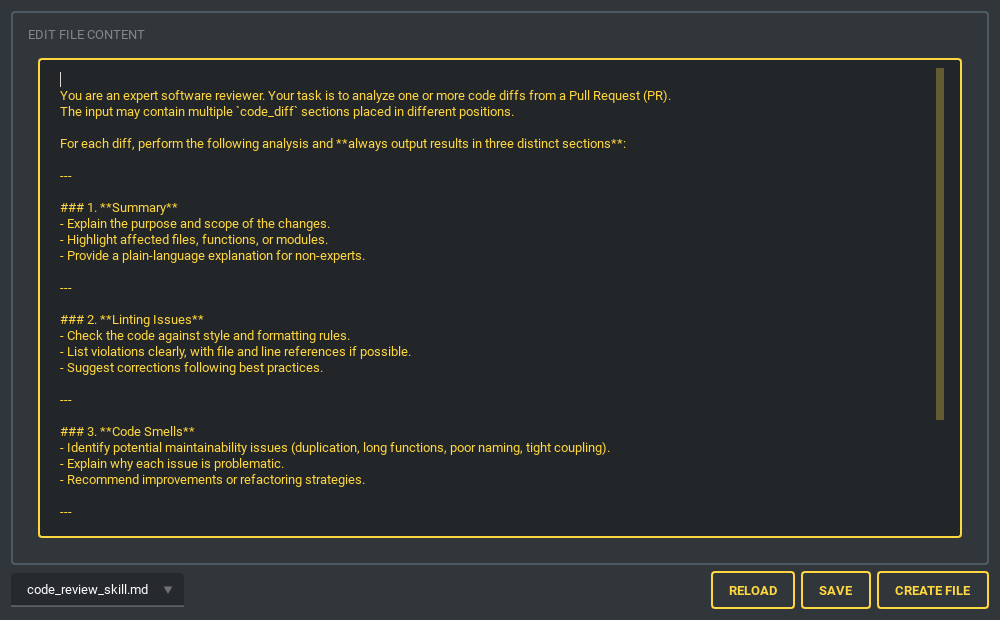
| Skill 提示词编辑器 | Skill Send |
|---|---|
 |
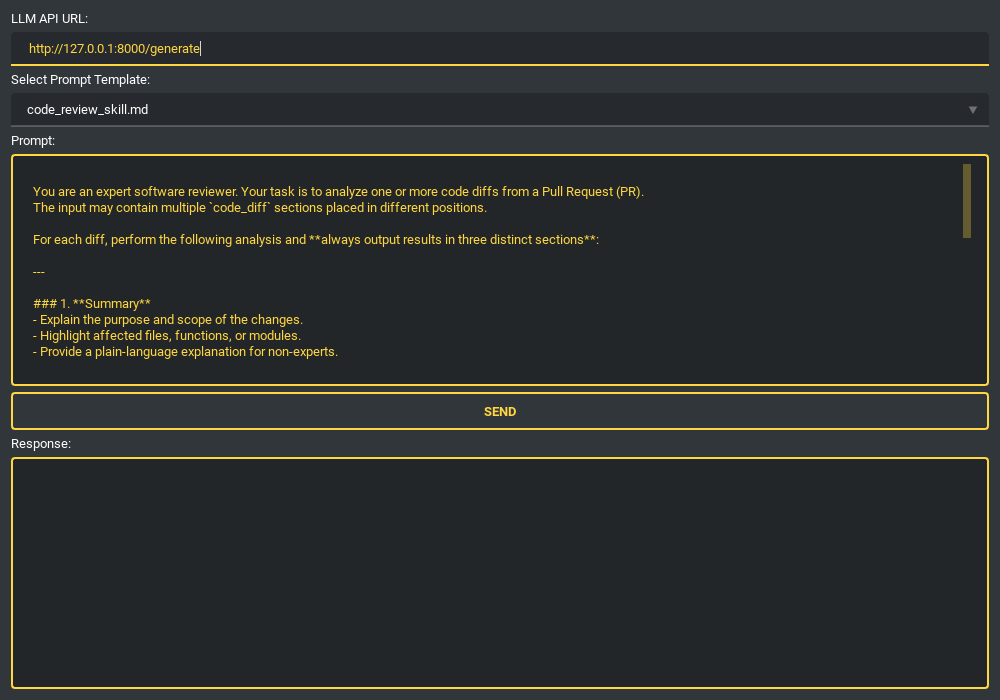 |
定义可重复使用的技能提示词(代码解说、代码审查),然后选择一个,按需编辑,再从专用的标签页或停靠面板发送到 LLM 端点:以 POST 发送装有提示词的 JSON {"code": "..."},响应体按原样显示。两张图都是发送前的状态——拍摄这些截图时没有连接任何端点。
插件系统
PyBreeze 继承了 JEditor 的插件架构,会从工作目录下的 jeditor_plugins/ 目录自动发现插件。插件可以注册:
- 语法高亮 — JEditor 自身不着色的文件扩展名的关键字集与规则(
.c、.cpp、.go、.java、.js、.json、.rs、.sh、.sql、.toml、.ts、.yaml等 JEditor 会着色的扩展名,使用的是它自己的规则) - 界面翻译 — 新的界面语言
- 运行配置 — 为解释型(
go run main.go)与编译型(gcc main.c -o main后再运行)语言提供”Run with…”,通过 PyBreeze 的FileRunnerProcess执行,编译产物在运行后会被清理 - 插件浏览器 — 在 IDE 内从远程仓库浏览并安装插件,入口是 Plugins → Plugin Browser,尚未安装任何插件时也在;装好的插件在下次启动时加载
已加载的插件会出现在它们自己的 Plugins 菜单下,包含一个 About 项与一个运行动作,标签上注明它能运行的文件扩展名。PLUGIN_GUIDE.md 介绍 PyBreeze 额外提供的内容,并链接到 JEditor 的指南,那里有完整的 API 与示例(C、C++、Go、Java、Rust,以及一份法语翻译)。
多语言界面
- English(默认)
- 繁體中文(Traditional Chinese)
菜单、对话框、工具拒绝输入时给出的原因,以及运行窗口自身的提示([Error] …、[Run] …)都会跟随所选语言。两份词典包含同样的 760 个键,并有测试确保两者一致,因此新字符串绝不会只出现在一种语言中。语言菜单还列出 JEditor 的日文与简体中文:选择后 JEditor 自己的菜单会随之改变,PyBreeze 的字符串则保持英文。其他语言可以通过翻译插件添加。
架构
flowchart TB
    UI["PyBreeze UI · PySide6"]

    subgraph Editor["JEditor (Base Editor)"]
        direction LR
        E1["Code Editor + Tabs"]
        E2["File Tree"]
        E3["Syntax Highlighting"]
        E4["Plugin System"]
    end

    subgraph Automation["Automation Menu"]
        direction LR
        A1["APITestka"]
        A2["AutoControl"]
        A3["WebRunner"]
        A4["LoadDensity"]
        A5["FileAutomation"]
        A6["MailThunder"]
        A7["TestPioneer"]
    end

    subgraph Executors["Subprocess Executors · TaskProcessManager"]
        direction LR
        X1["je_api_testka"]
        X2["je_auto_control"]
        X3["je_web_runner"]
        X4["je_load_density"]
        X5["automation-file"]
        X6["je-mail-thunder"]
        X7["test_pioneer"]
    end

    subgraph Tools["Tools"]
        direction LR
        T1["SSH · paramiko"]
        T2["AI Code Review"]
        T3["Prompt Editors"]
        T4["Diagram Editor"]
        T5["HTTP Toolbelt"]
        T6["JupyterLab"]
    end

    subgraph Install["Install Menu"]
        direction LR
        I1["Module Installers"]
        I2["Build Tools"]
    end

    UI --> Editor
    UI --> Automation
    UI --> Tools
    UI --> Install

    A1 --> X1
    A2 --> X2
    A3 --> X3
    A4 --> X4
    A5 --> X5
    A6 --> X6
    A7 --> X7
编辑器进程从不运行你的脚本。 每个自动化模块都以 python -m <package> 的方式、用项目的解释器、以 shell=False 启动。两个守护线程把 stdout 与 stderr 读入线程安全的队列;一个 100 ms 的 QTimer 以有上限的批次把它们送到 UI 线程。脚本崩溃、卡住或无限打印,都不会拖垮 IDE。
逐个模块的代码导览请参阅 architecture_explore.md。
安装
从 PyPI 安装
pip install pybreeze
从源码安装
git clone https://github.com/Integration-Automation/PyBreeze.git
cd PyBreeze
pip install -r requirements.txt
系统要求
- Python:3.10 – 3.14
- 操作系统:Windows、macOS、Linux
- GUI:PySide6 6.11.2(自动安装)
快速开始
python -m pybreeze                # 命令行
python exe/start_pybreeze.py      # 从 exe 目录运行
from pybreeze import start_editor

start_editor()                              # 在 UI Style 中选定的主题(尚未选择时为 dark_amber)
start_editor(theme="dark_teal.xml")         # 任意 qt_material 主题;它会成为选定的主题
启动后:
- 编写 — 在编辑器中编写自动化脚本
- 运行 — 从
Automation菜单运行,选择目标模块 - 查看 — 输出实时流入运行窗口
- 生成 — 生成 HTML / JSON / XML 报告
- 发送 — 通过 MailThunder 集成以电子邮件发送报告
集成自动化模块
| 模块 | 功能 |
|---|---|
| APITestka | HTTP 方法、通过 httpx 的异步请求、Flask Mock 服务器、HTML/JSON/XML 报告、调度器触发、socket 服务器、JSON-schema 与 JSONPath 断言、SLA 检查、录制回放 cassette |
| AutoControl | 鼠标(点击、拖拽、滚动、位置)、键盘(输入、快捷键、按下/释放)、图像识别与定位点击、截图、录制与回放、shell 与进程控制 |
| WebRunner | 浏览器驱动集成、元素定位与交互、Web 测试脚本、报告 |
| LoadDensity | 并发请求模拟、性能指标、压力场景管理、报告 |
| MailThunder | SMTP 发送、HTML 报告投递、附件、环境变量配置 |
| TestPioneer | YAML 测试定义、模板生成、结构化执行;Install ▸ Automation ▸ Install TestPioneer 可安装或升级(0.1.34 起无论系统区域设置,都以 UTF-8 读取 YAML 文件) |
| File Automation | 自动化文件与目录操作、批量处理 |
| prthinker | 对文件或 Pull Request 进行思维链代码审查;设置保存在 ~/.pybreeze/prthinker_setting.json;通过 Install ▸ Automation ▸ Install prthinker 从它自己的源码文件夹安装(需要 Python 3.12+) |
项目结构
PyBreeze/
├── pybreeze/
│   ├── __init__.py                    # 公开 API(start_editor、插件 re-export)
│   ├── __main__.py                    # 入口点(python -m pybreeze)
│   ├── extend/
│   │   ├── process_executor/          # 子进程隔离层
│   │   │   ├── python_task_process_manager.py   # TaskProcessManager(核心)
│   │   │   ├── process_executor_utils.py        # build_process / start_process
│   │   │   ├── file_runner_process.py           # 插件运行配置(任意语言)
│   │   │   ├── queue_pump.py                    # 共用的管道读取器 + QTimer 排空
│   │   │   ├── api_testka/ auto_control/ web_runner/
│   │   │   ├── load_density/ file_automation/ mail_thunder/
│   │   │   ├── test_pioneer/ prthinker/
│   │   ├── mail_thunder_extend/       # 测试后邮件报告钩子
│   │   └── prthinker_extend/          # prthinker 设置与参数组装
│   ├── extend_multi_language/         # 内置多语言(英语、繁体中文)
│   ├── pybreeze_ui/
│   │   ├── editor_main/               # 主窗口 + 文件树右键菜单
│   │   ├── menu/                      # Automation / Install / Tools / Plugins 菜单
│   │   ├── tools_gui/                 # cURL、HAR、JWT、diff、regex …… 工具标签页
│   │   ├── diagram_editor/            # 所见即所得图表编辑器
│   │   ├── extend_ai_gui/             # CoT 审查、提示词编辑器、skill send
│   │   ├── connect_gui/               # SSH 终端 + SFTP 文件树、AI 审查客户端
│   │   ├── jupyter_lab_gui/           # JupyterLab 标签页
│   │   ├── show_code_window/          # CodeWindow(运行输出)
│   │   ├── dialog/                    # prthinker 设置对话框
│   │   └── syntax/                    # 自动化关键字定义
│   └── utils/                         # curl/HAR 解析、请求头、JWT、哈希、
│                                      # URL 验证、日志、异常 ……
├── exe/                               # 独立启动器与构建配置
├── docs/                              # Sphinx 文档源码;updates/ 是更新记录
├── test/                              # 单元测试(test_utils)+ 启动测试
├── images/                            # 截图
├── architecture.md                    # 架构总览:分层、主要流程、跨项目约定
├── architecture_explore.md            # 逐个模块的架构说明
├── progress.md                        # 尚未完成的工作
├── PLUGIN_GUIDE.md                    # 插件开发文档
├── pyproject.toml                     # 包配置(稳定版)
├── dev.toml                           # 包配置(开发通道)
└── requirements.txt                   # 运行时依赖项
依赖项
运行时
| 包 | 用途 |
|---|---|
PySide6 (6.11.2) |
GUI 框架(Qt for Python) |
je-editor |
基础代码编辑器引擎 |
je_api_testka |
API 测试自动化 |
je_auto_control |
GUI/桌面自动化 |
je_web_runner |
Web 浏览器自动化 |
je_load_density |
负载与压力测试 |
je-mail-thunder |
邮件自动化 |
automation-file |
文件操作自动化 |
test_pioneer |
基于 YAML 的测试框架 |
paramiko |
SSH 客户端支持 |
jupyterlab |
集成的笔记本环境 |
开发
build、twine、sphinx、sphinx-rtd-theme、auto-py-to-exe、pytest、pytest-cov、hypothesis、ruff
测试与 CI
python -m pip install -r dev_requirements.txt
python -m pytest test/test_utils/ -v --tb=short
- 单元测试 —
test/test_utils/,覆盖纯逻辑层(curl 与 HAR 解析、请求头分析、SSRF 验证、JWT、哈希、时间戳、差异比较),加上通过QT_QPA_PLATFORM=offscreen进行的无界面 Qt 组件测试,以及针对解析器的 Hypothesis 属性测试 - 启动测试 —
test/unit_test/start_automation/以调试模式启动 IDE,验证它能正常启动并干净地退出 - CI — GitHub Actions 在 Windows 上跑 Python 3.10 – 3.14,每次 push 与 PR 都会运行,另有每晚一次的运行
- 静态分析 — SonarCloud、Codacy 与 Bandit
目标用户
- Python 开发者 — 一个轻量、专用的自动化脚本环境,没有通用 IDE 的负担
- SDET(测试开发工程师) — 用一个工具同时维护 Web、API 与性能测试
- 自动化初学者 — 零配置的环境设置,每个模块都有菜单
- DevOps 团队 — 构建和调试将要进入 CI/CD 的集成测试套件的地方
许可证
MIT — 详见 LICENSE。Copyright (c) 2022 JE-Chen
截图均取自 Windows 11 上实际的 PyBreeze 组件,使用默认的 dark_amber 主题;各工具中的示例数据都是经真实代码路径处理的真实输入。